joymapper - Map Gamepad Buttons to Keyboard

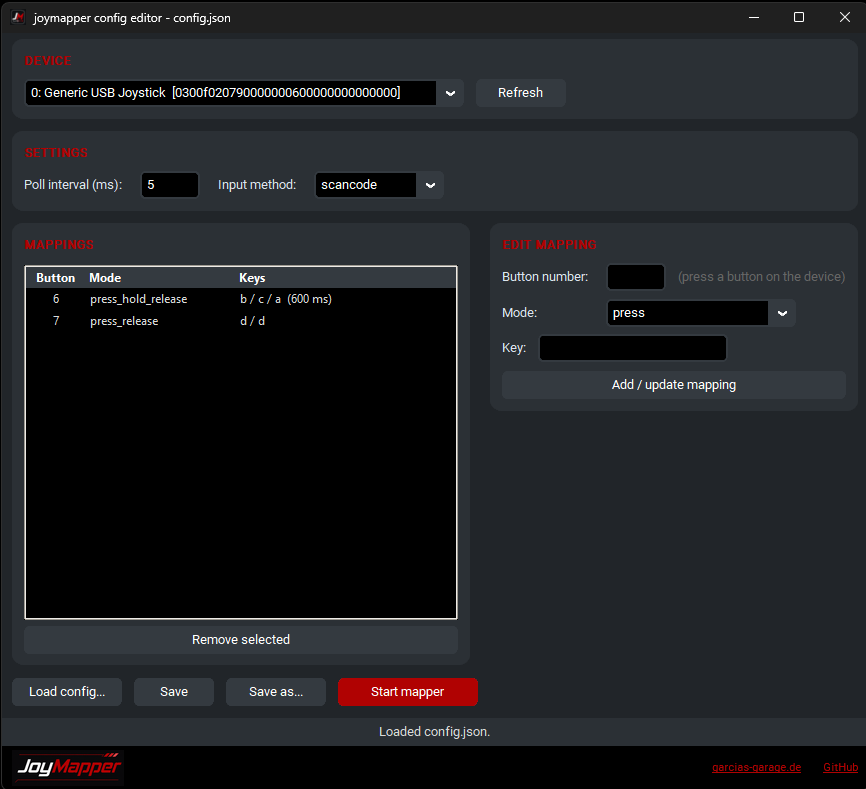
joymapper is a small Windows tool that reads inputs from a specific gamepad or button box and sends keyboard events to Windows or the currently active application. The included GUI does all the work for you: press a button on your device, pick a mode and keys, save, start the mapper. Done. For purists, the whole thing can also be driven as a pure command-line tool.
Download: Grab the latest prebuilt Windows binaries from the GitHub releases page - no Python required.
Why yet another mapping tool?
Because I couldn't find one that does exactly what I want. joymapper supports seven different mapping modes - perfect for button boxes in sim racing where a single physical button should do more than one thing.
Features
- GUI config editor: press a button on any connected device and the GUI selects the device and creates the mapping for you - no JSON editing required
- Identifies the target device by GUID (reliable across reconnections and reorders), with an optional name fallback
- Multiple devices per config
- Seven button mapping modes
- Configurable poll interval and long-press threshold
- Graceful shutdown (releases any held keys)
The seven mapping modes
| Mode | What it does |
|---|---|
press_release |
Send one key on button-down and another on button-up |
toggle |
Cycle through a sequence of keys on each press |
press |
Send a key on each button-down |
hold |
Hold a key while the button is held |
short_long_press |
Send different keys for short vs. long press |
short_long_press_hold |
Like short_long_press, but the long key is held until button-up |
press_hold_release |
Key on press, another after threshold while held, another on release |
Quick start (GUI)
- Download and unzip the latest release, then run
joymapper-gui.exe(keep both executables in the same folder) - Press a button on your device - the GUI automatically selects the device and creates the mapping for that button
- Pick a mode, fill in the key fields and click Add / update mapping
- Save, then click Start mapper
You can map several devices in one config: just press a button on another connected device.
Good to know (Windows)
- The executables are not code-signed, so SmartScreen shows a warning - click More info -> Run anyway. Some antivirus tools may flag the download: joymapper simulates keyboard input (that is its job). These are false positives - you can always audit the source and build the executables yourself.
- If your game ignores the simulated keys, set the input method to
scancode- keys are then sent as hardware scan codes, which most games accept. - If keystrokes are not received by the target application, try running joymapper as Administrator.
Links
- Download (Windows binaries): github.com/vgarcia007/joymapper/releases
- Source Code & full documentation: github.com/vgarcia007/joymapper